Freelance Jobs

Wednesday, May 28, 2014

What are Backlinks

Understanding BackLink and Anchor Text. 

What-are-BacklinksBackLink.
Are links from another website to your website.
Google uses the number of backlinks as a sign of authority.
All things being equal, one website with more backlinks than another website of a similar topic will rank higher.
 
 What-are-BacklinksAnchor text:
The text that you use when making a link to another website.
itlearn2earn.blogspot.com 
itlearn2earn
Click here

Which one anchor text is best and which is bad.
itlearn2earn.blogspot.com: "Good"            itlearn2earn: "Best"  Click here: "Bad"
Before create a link to any website you must check the popular anchor text on that site.
Copy site URL where you want to submit backlink. And past www.Linkdiagnosis.com
Here you see “backlink, top pages and the most popular anchor text”.
Now use the popular anchor text to you article and publish it. 

How to create an anchor text backlink in the comments.
When you submit comments on any site for backlinks, here you use anchor text backlinks. Today I teach you how can you do it. Copy this code and paste into the comments, And do some change.
                   itlearn2earn.blogspot.com/" target="_blank">itlearn2earn

Change "itlearn2earn.blogspot.com" with your website name and "itlearn2earn" with anchor text.
Now paste code in the comments. 
Read more about Search Engine Optimization.


Get Backlink through comments.

1) Go to www.Google.com
2) Search “blogsearch.google.co.uk”.
3) Search keyword that like your content.
4) In comments section.
     Write your name, your email address and website URL
     After this write your comments, You must submit comments that related to the article
     where you want to  comment.
     In the end write your site URL again.
5) now click on submit comment.
Your have done it.
   
How to Find all backlinks of my competitors sites?
There are many types of site that check your blog backlinks.
1. Free ones
2. Paid ones
3. Forum who can provide this service for cheap, like some price per site.
So based on the replies, here is the list of tools

1. http://www.opensiteexplorer.org/ -  Free

2. http://www.semrush.com/ - Free

3. http://www.majesticseo.com/ - Paid site that provide Full backlink report.

4. https://ahrefs.com/ - It showed nearly all backlinks of my website as reported by webmaster tool.
This one is interesting, 
  It is paid.

5. http://smallseotools.com/backlink-checker/

6. http://webmeup.com/tools/backlinks.html
.
Keep learning with "itlearn2earn".

Thursday, April 17, 2014

Adsense Alternatives

Adsense-AlternativesGoogle AdSense is a main of Sources Earning  through Site/Blog but you know its not easy to "Verified Google Adsense Account" with Website/Blog. For this reason today i describe you how could you start  earning with Google Adsense without to much wait. You have no need to buy google Adsense account form someone, or any website and not wait for 6 month.
Adsense-AlternativesFirst go to www.YouTube.com and Create your youtube account or just sign in if you have already account. Then go to your profile inside upload button and click on it and then click on Video manager. After that go to Channels Setting click on verified your mobile number google send you verification code insert code in text bar then click continue and press OK button. Enable "Moretization", click  enable monetization account then check all 3 small box and click on accept button.

 After this go to channel setting and click monetization setting then select "how will i get paid in monetization". Click the link Associate adsense account. Setup user name on youtube to give same information then next. Complete a necessary step. Now you have ready for Earning money with Google Adsense.
Lets us know about your opinion.

Friday, April 4, 2014

Remove Timeline

Facebook-Timeline
Will this method allows you to Enable/Disable Timeline of you own choice. For more details Please Visit/type http://itlearn2earn.blogspot.com . Now select/choose your browser among following.


                      (Download your Browser Here for Timeline add on)
 

    Remove TimelineRemove-Timeline
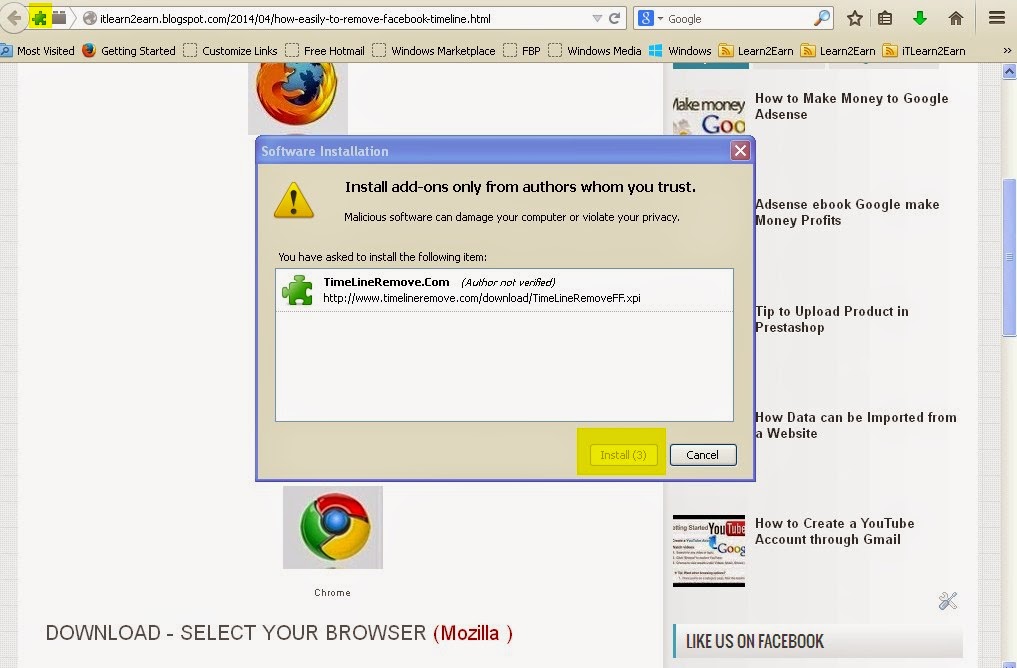
  1. As we click on Mozilla fire fox, you would see a button "Allow"  on your Browser top left corner, press Allow button & now install option appeared, at you screen.
  2. Click  "Install Now" and by few second it will install automatically.
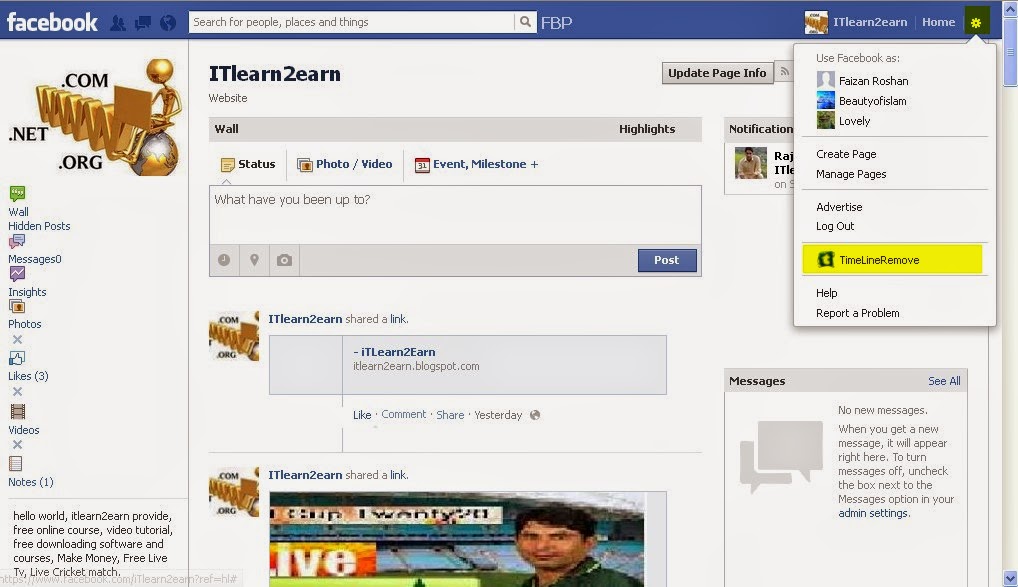
  3. Now log-in your Facebook Account, as your Facebook page appear, go in setting on right top corner.
  4. Just click on "Timeline" Option, you will see in menu of setting. (see pic)
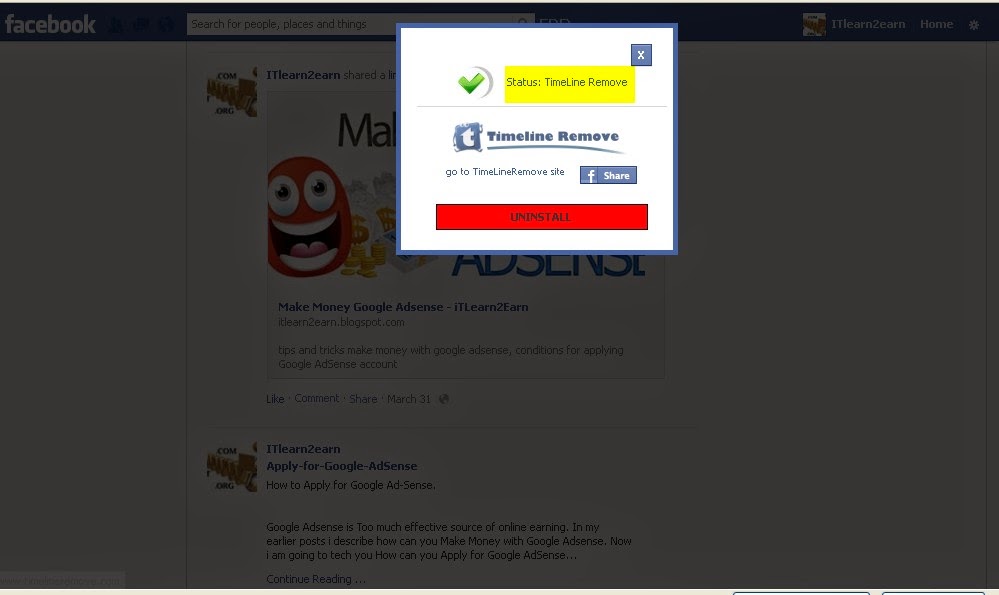
  5. In new window click on switch the timeline then its remove Timeline on you Facebook.
  6. Now you can "Switch between Old Facebook Style and Timeline Style".
Remove-TimelineLike "itlean2earn" on Facebook fan page and Give me your feedback, your feedback is highly valuable & appreciation. Thank You


Tuesday, April 1, 2014

YouTube Account

YouTube-AccountCreate a YouTube Account with the help of Google Account.

Signup for an account on YouTube. If you don't have google account, here's how to get started. First i tell you how to create you Google account on different devices like computer, Android etc.
1: Create a Google Account on your Computer.
Go to www.youtube.com and click on sign-In upper right corner of YouTube on your computer. Then click on create account and fill all the information in text bar for new account. You will be asked to create your new google account during signup. This should be your new Email address only. Once you have done setting to your google account and click back to YouTube.
2: On the You-tube Android App.
Open YouTube site and touch the menu and go to sign-In. Touch add account and then go to new to create account.
After that you sign-up for YouTube and easily Create YouTube Account. You can take advantage of many YouTube features, including Like, subscribe, Favorites, Watch Later and Watch History.
If you like to update your own videos, comments on videos, or create playlists, you can create a channel.

YouTube-AccountCreate YouTube Channel for Personal.

  • Make sure you're sign-in to YouTube.
  • Go to "create a channel".
  • Check the details and click OK to create your own channels.

Create YouTube Channel for Business.

  • Sign-In you YouTube account.
  • Go to all my channels.
  • If you want to make a YouTube channels for Google+ page that you manage, you can choose it here otherwise, click crate a new channel
  • Give all the information to create your new channels.

Monday, March 31, 2014

Search Engine Optimization

Search-Engine-OptimizationHow to submit your site/blog to "Bing Search Engine" with Webmaster Tool. 

Webmaster tools play an important role to increase traffic and get high page rank for website/ blog.With out use of webmaster you never achieve any goal. Its valuable tool like other "Google Analytical" Google Ad-word" and "Google Ad-sense". Webmaster is an SEO tools that help you to take your site/blog on the top. After making your site/blog you need to submit a site to all main Search engines.There are three main search engine "Google, Bing and Yahoo". First of all submit a site/blog on Google search engine with the help of "Google Webmaster Tool" and then submit to Bing and yahoo.
Today I'm going with "Bing Webmaster Tool" to add site/blog on Bing and Yahoo search engine.
    Search-Engine-Optimization
  • Go to "bing webmaster tool" and create you bing account. You need a Hotmail email id for this. If you have already account, then just sign-in your Bing account.
  • Now you see Bing Webmaster tools "Dashboard", here click to "My Site" or "Add a Site" in the left sidebar.
  • In a new window write your Site URL in text bar and click Add button.

Search-Engine-Optimization
After processing you can see, you site show in Dashboard with site analyzer and many other future tools. Its enough to submit your site/blog on google and bing. when you submit site to bing its automatically submits to yahoo search engine. Viewer keeping visiting my blog and give you valuable feedback.

Freelance Jobs
Recommend Us On Google
Like Us On Facebook